
Notice
Recent Posts
Recent Comments
Link
| 일 | 월 | 화 | 수 | 목 | 금 | 토 |
|---|---|---|---|---|---|---|
| 1 | 2 | |||||
| 3 | 4 | 5 | 6 | 7 | 8 | 9 |
| 10 | 11 | 12 | 13 | 14 | 15 | 16 |
| 17 | 18 | 19 | 20 | 21 | 22 | 23 |
| 24 | 25 | 26 | 27 | 28 | 29 | 30 |
| 31 |
Tags
- bitcoin
- BOB10기
- UTXO
- BOB10기합격후기
- 안드로이드 앱 진단 환경설정
- BOB 합격후기
- golang
- FlagOneLoginActivity
- injuredandroid
- AndroGoat
- apk easy tool
- BOB후기
- BOB면접
- XSS
- 보안제품개발
- 앱변조
- 솔루션개발
- FlagTwoActivity
- Burp Suite CA
- 블록체인
- injuredandroid.apk
- jadx
- 자산추적
- Frida
- SlubBackdoor #응용 #악성코드 #악성코드_제작 #Python #깃허브를_이용한_악성코드
- smali
- 비트코인
- Burp Suite
- NOX
- blockchain
Archives
- Today
- Total
Kye0m's Security
[injuredandroid.apk] Flag Seven - SQLITE 본문
Injuredandroid.apk - Flag Seven -SQLITE
이 문제는 플래그와 패스워드를 입력하여 통과하는 문제이다.
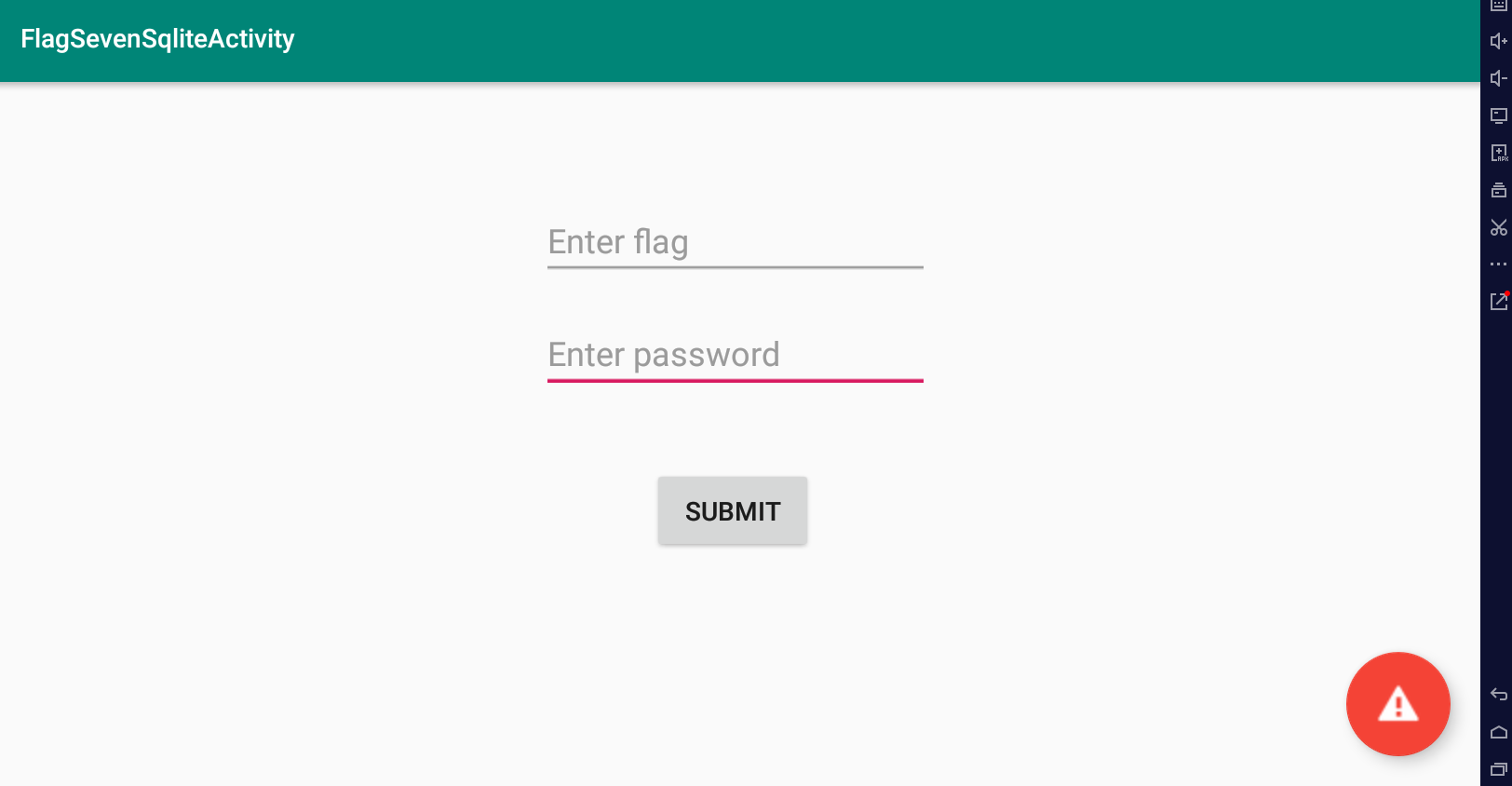
문제풀이
public void onCreate(Bundle bundle) {
        super.onCreate(bundle);
        setContentView(2131427369);
        C(findViewById((int) i.toolbar));
        j.g.a(this);
        H();
        findViewById((int) i.fab).setOnClickListener(new a());

        SQLiteDatabase writableDatabase = this.u.getWritableDatabase();
        //데이터베이스 생성
        ContentValues contentValues = new ContentValues();
        contentValues.put("title", Base64.decode("VGhlIGZsYWcgaGFzaCE=", 0));
        contentValues.put("subtitle", Base64.decode("MmFiOTYzOTBjN2RiZTM0MzlkZTc0ZDBjOWIwYjE3Njc=", 0));
        //sql의 title과 subtitle에 base64로 값을 인코딩하여 넣어준다
        // title -> The flag hash!
        // subtitle -> 2ab96390c7dbe3439de74d0c9b0b1767

        writableDatabase.insert("Thisisatest", null, contentValues);
        contentValues.put("title", Base64.decode("VGhlIGZsYWcgaXMgYWxzbyBhIHBhc3N3b3JkIQ==", 0));
        //title에 base64로 디코딩한 값을 넣음
        // title -> The flag is also a password!
        contentValues.put("subtitle", h.c());
        //subtitle에 h클래스 c의 리턴값을 넣어준다.
        writableDatabase.insert("Thisisatest", null, contentValues);
    }
값이 나온다. flag값을 알아냈고
이제 h클래스의 c의 리턴값을 알아보면
public void onDestroy() {

        this.u.close();

        deleteDatabase("Thisisatest.db");

        l lVar = this.E;
onDestory()의 일부를 보면 SQLite의 데이터베이스 파일이름이 thisisatest.db 인것을 알 수 있습니다.
adb shell을이용하여, 에뮬레이터에 접근한 후, grep 명령어를 이용해서 데이터베이스의 위치를 찾습니다.
find | grep "Thisisatest.db"이후 adb pull 명령어를 이용하여 데이터 베이스를 가져옵니다.
adb pull "데이터베이스 위치"
이후 sqlite를 통해서 "Thisisatest.db"를 열어줍니다.
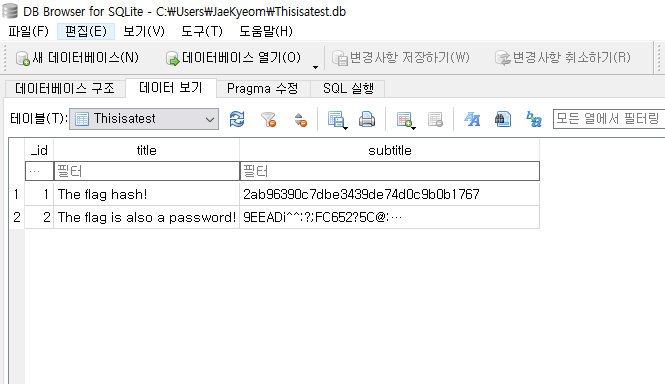
2ab96390c7dbe3439de74d0c9b0b1767을 md5로 복호화 해주고,
9EEADi^^:?;FC652?5C@:5]7:C632D6:@]4@>^DB=:E6];D@? 를 ROT47로 인코딩해주면 아래와 같은 주소가 나오게 되는데, 주소에 들어가면 패스워드를 얻어낼 수 있다.


'앱 모의해킹 > Injuredandroid.apk' 카테고리의 다른 글
| [injuredandroid.apk] Flag Six - Login3 (0) | 2022.09.12 |
|---|---|
| [injuredandroid.apk] Flag Four - Login2 (0) | 2022.09.12 |
| [injuredandroid.apk] FlagThree - Resources (0) | 2022.09.12 |
| [injuredandroid.apk] FlagTwo - Exported Activity (0) | 2022.09.12 |
| [injuredandroid.apk] FlagOne - Login (0) | 2022.09.12 |
'앱 모의해킹/Injuredandroid.apk' Related Articles
more


